DarthDemono’s Notes for Computer Systems L+Pr / IP-18fSZGREG
How Computers Work
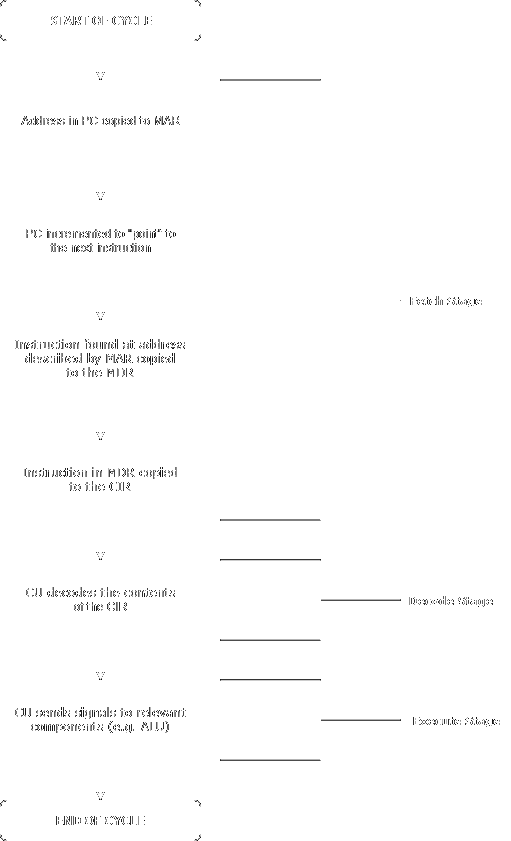
CPU Cycle
Storage hierarchy

Network Fundamentals
Networks evolved from ARPANET → TCP/IP (1983). SSH replaces insecure telnet/FTP (unencrypted). Command:
ssh {username}@serverComSys Server Access
- SSH
ssh {neptun}@comsys.inf.elte.hussh LS1234@comsys.inf.elte.hu) - Password: your Neptun password
- You’re in
/afs/inf.elte.hu/user/L/LS/LS1234/. cd publicto access your documents which are also publicly available
Essential Editors
vim (powerful, modal):
vim file.sh # i=insert, esc=:wq=save&quit, :q!=quit no save, dd=delete line, yy=copy line, p=pastenano (beginner-friendly):
nano file.sh # Ctrl+O=save, Ctrl+X=exitman vim, man nano for help.
Linux Commands from Lectures
| Command | Purpose | Examples |
|---|---|---|
ls | List directory (-l=details, -a=hidden) | ls -la (lists all files (including hidden) with details and permissions) |
pwd | Print working directory | pwd → /afs/inf.elte.hu/user/L/LS/LS1234/ |
cd / mkdir / rmdir | Navigate / create / remove dirs | cd .., mkdir comsys, rmdir empty |
cp / mv / rm / ln | Copy / move / delete / link | cp file1 file2, mv old new, rm -r dir, ln source target |
chmod | Change permissions (rwx, 644=owner rw) | chmod +x script.sh (makes file exexutable), chmod 755 file (grants the owner read, write, and execute permissions) |
chown / chgrp | Change owner/group | sudo chown user:group file |
passwd | Change password | passwd |
who / whoami | Logged-in users / current user | who, whoami → LS1234 |
ps | Processes | ps aux → Lists all active processes |
top | Live processes/priorities | top (q=quit) |
find | Search files | find . -name "*.sh" |
cat / head / tail | View files | cat file (shows file), head -5 file (shows first 5 lines), tail -5 file (shows last 5 lines) |
grep | Filter lines (regex) | grep "error" file, grep -r "TODO" . |
wc | Word/line/char count | wc -l file (shows file lined count) |
man | Shows command details | man nano (shows details about nano) |
Running Executables
chmod- Make executable:
chmod +x myscript.sh # makes any files 'executable' - Run:
./myscript.sh
# './' -> current directory
- Make executable:
Sourcesource myscript.sh
File Operations
Zip/Compress:
zip -r homework.zip homework/    # ZIP format
tar czvf homework.tar.gz homework/  # GZipped TAR
gzip file.txt # .txt → .txt.gzMove:
mv source dest/          # Rename/move file/dir
mv file1 file2 dir/ # Multiple filesRemove:
rm file                  # File (no recycle bin!)
rm -r dir/               # Recursive directory
rm -rf dir/              # Force, no prompt (dangerous!)
Exam Samples
Midterm
Endterm
Course command usage examples
- list→filter→transform→aggregate:
ls -l *.sh | grep "May" | awk '{print $9}' | wc -lls *.ps1 | Where { $_.LastWriteTime.Month -eq 5 } | Select Name | Measure